I remember when I started studying computer science. At that time, I was very eager to try new stuff. I still am. I also remember there was a lot of discussion about which Linux distro to use. I tried many of them: I tried SuSE, I tried Mint and, at one point, I decided to try Gentoo.
Gentoo, for those who don’t know about it, was a very unique concept because you would build every single thing for your machine. You compiled everything from the ground up.
I remember it would take hours and days to get a minimal UI working, and this was without even thinking of building things like OpenOffice, which were giant pieces of software. Since everything was built from the ground up, you had to get your system built piece by piece, which involved a lot of manual command-line typing: setting up the system, configuring it, and so on.
It was a learning experience, but it was also frustrating. From time to time you would get an error after hours of compilation where you would need to go back and try to figure out what was broken and why it didn’t work. At that time, the community was strong enough for you to be able to navigate these problems by yourself and that provided a fantastic learning experience.
That’s where most of my terminal foundations came from, and I still rely on those skills, it paid dividends in my life. I’ve used this skills set up a very high-performing WordPress sites on very cheap systems. and while that article is very old and certainly outdated, the concept behind it is still valid.
These days, I happen to interact frequently with AI, and during these holidays I leveraged AI to build a couple of things for myself. I realized that the knowledge I do have is still helpful, because AI was making some errors here and there, and I was able to spot them, understand them, and figure out why something was broken.
I’m now starting to believe that moving forward, leveraging AI will lead to greater performance and greater speed, but we’ll still need two critical things whenever we build something.
The first, as developers, is understanding: having at least a partial understanding of the technologies involved. Not because it’s useful as applied knowledge, we might not even apply them directly since AI will become even better in the future, but as directive knowledge Something that is critical for tying pieces together, as well as seeing the flaws in AI’s code and proposals. To get that, we need to embrace the somewhat painful and kind of boring, compared to “just building it with AI”, slow work of practicing and learning the technologies from the ground up. Working step by step, failure by failure. This goes hand in hand with leveraging AI more and learning how to delegate more, and better, work.
The second thing, I plan to write more about it, is knowing what to build and what not to build. That is another key component of every software-building cycle that will need more attention in the future.
So if there’s anything I hope the next years will give people, including me, it’s: the passion, the time, and the willingness to pursue learning things from the ground up, to understand systems/technologies and how they connect to each other and to use them as a foundational tool to better direct their work as AI takes even a more prominent place in our daily work life.
PS: Related to this article is the concept of Mental Maps
Sometimes you join a project and realize you don’t know the best practices there. It’s a new project, either new in general or new to you because you’ve joined a new team or started helping on a different codebase. This has happened to me quite a few times.
When that happens, a few things can occur. First, the documentation might be up to date, which is great. But from time to time the documentation might not be aligned with the latest standards. This can happen for more mature projects, or when a project is in the very early stages and best practices are still evolving.
In those moments I ask myself, “What are the best practices?” I either try to follow the framework’s recommended practices, or, if I have more experience with a specific framework ,I mix the framework’s best practices with my own learnings, experience, and judgment.
Recently I realized we can actually backfill that information, thanks to AI. You may have heard me mention AI before and that’s because I use it daily for product work and coding, and I think it offers many opportunities to change how we work, no surprise I’m bringing it up again here.
Where do a project’s best practices live?
Whenever we interact on a pull request and comment that something is not quite right or should be done differently, we are implicitly documenting an expectation, a behaviour.
A PR comment might say, “You did it this way, but the way we prefer to approach this for this project or our goals is different.” That information lives in the pull request, but it is sometimes not translated into the formal documentation. For many reasons, bandwidth, speed, whatever, we might not move those comments into the docs.
That information, though, can be used to document the latest best practices on a project and there are two main ways to do this. The first is through deep research. The second is through MCPs and the CLI toolings.
Deep research
Deep research is a way for AI to think more deeply about a topic, search widely, and create a detailed document based on what you ask.
If your project is open source or your repository is publicly available, this is especially powerful: you can ask the tool to review the repo, check comments from code owners in the last 50, 100, or 200 pull requests, and use that information as the source to gather the latest best practices for that codebase.
This can produce documentation of the current recommended approach to development and the things to pay attention to (please don’t trust the output without checking it, but it’s a good starting point. Most tools call this “deep research.”: Perplexity, ChatGPT, Claude, or Gemini should support this and it’s all a matter of finding the right prompt.
Deep research might take minutes (even 20 minutes sometimes), but it’s so powerful for this use case.
MCPs and the CLI
The other approach is to use MCPs and command-line tools to gather information about a private project.
MCP stands for Model Context Protocol, and it’s a way for AI tooling to interact with external systems to retrieve information.
For example, the MCP for GitHub would allow you to query pull requests and comments. You can do something similar if you’re running AI locally with Claude Code/Open AI Codex by asking it to use the GitHub CLI to gather PR information and comments.
In this case you prompt the tool to analyze the PRs, but you must craft the prompt slightly differently depending on whether you use an MCP integration or CLI commands to fetch the data.
Once the research is finished, you have a baseline that tells you what’s currently used, what’s considered best, and how to approach implementation.
I personally find this very helpful when approaching new codebases. Even if you have multiple contributors, you can use this method to identify different points of view and align everyone on the same page.
A last note: AI tooling are changing quickly, so if you revisit this content later, check the current best practices and available tools.
Have you ever started a new project and felt like you were dropped into a dense fog, unable to see more than a step ahead? That’s how most journeys into the unknown begin, whether you’re learning a new skill, tackling a complex problem at work, or exploring a fresh domain. At first, everything is blurry and uncertain. But as you move forward, the fog lifts, revealing the landscape piece by piece.
This is how I think about building expertise: not as a sudden leap, but as a gradual act of mapping out unfamiliar territory. I call these “mental maps.” Unlike mind maps, which are creative tools for brainstorming, mental maps are your internal compass, a living, evolving sense of where you’ve already been, what you understand, and what’s still hidden in the mist.
In this piece, I’ll share how I build my mental maps, why they matter, and how they’ve helped me transform confusion into clarity, one step at a time.
What is a mental map?
Many years ago, I was playing the game StarCraft. Each match began with the entire map shrouded in darkness and in the fog. You had no clue where the enemies lurked, where resources were hidden, or what dangers awaited. Every move your units made revealed a little more of the terrain, but also exposed you to new threats. The thrill of discovery was matched by the constant risk of the unknown.
That’s exactly what building expertise feels like to me. With every question asked and every problem solved, a bit more of the fog lifts, the map of your understanding becomes clearer and that inner compass you have about the project starts working.
Whenever I work on something, I operate like a unit moving through the map. Initially, everything is blurry and the map is foggy, I might understand the overall domain of the project, but I would hardly be able to answer questions about it. I may be able to take educated guesses based on my experience and previous knowledge, but if this is a new domain, everything will be foggy.
Whenever I encounter a problem, I dive in and start clearing away the fog. Whether I’m solving a technical challenge or trying to understand how a system works, each exploration reveals a new piece of the map.
Over time, my knowledge becomes more refined, and I start to visualize the map in my mind.
Note: I'm not good at "actual visualization" in my mind, but while I can't visualize something, I am somehow able to keep all this complexity in my mind, ready and easy to navigate as if I'm trying to remember how to get from point A to point B in my hometown.
Once I have enough awareness of the project elements, I can make quicker decisions and spot potential problems or roadblocks if we go one route versus another.
Why forming a mental map is important
Why is forming a mental map so important?
It allows you to make faster, more confident decisions.
You can spot potential problems or opportunities before they arise.
It helps you communicate more clearly with your team.
I believe that the ability to visualize a project as a map, to have an internal awareness of what the project entails, is crucial for tackling complex problems.
For example, if I’m working on developing a new feature for an app, this skill gives me an intuitive understanding, within its limits, of the consequences and impacts of decisions, as well as new ways to proceed. This intuition is instinctual, so once the map is formed, I don’t need to think about it too much. If the map wasn’t formed, I would need to explore to discover first, to have an actual understanding of what a choice would imply.
For instance, if someone asks me, “Can we have a feature that programmatically adds tasks to our board?” and I haven’t formed an opinion in my mental map, I wouldn’t be able to answer right away. But if I already have a mental map with enough information, the answer comes instantly.
Obviously, there’s a downside: we’re not perfect, and I may be wrong (also, this kind of intuitive thinking might be reminded of System 1 thinking, from Thinking Fast and Slow, and you would be correct.). The main advantage is having an internal overview of the project’s status and making quicker decisions.
This is why I think mental maps are extremely important for everyone. I don’t know if everyone thinks this way, but I believe it’s a valuable skill in the toolset. There will be times when you’re asked to understand where you are in your work. It might be easy to say what you’re doing now, but having a good understanding of all the things and ramifications of a project might not that quick. In fact, sometimes you discover the gaps in your analysis only afterward because you didn’t explore or form the map properly.
Building a useful map
One approach I take to build a meaningful map is to avoid focusing on the same work repeatedly, therefore expanding my scope.
For example, if our goal, as I mentioned, was to find ways of programmatically adding tasks to the board (let’s assume we’re doing a task manager), I would move across different codebases or project areas to understand the project’s limits, boundaries, and potential issues. Only after “navigating” the scenario, not just by skimming topics but by going into it, would I then start forming the brain connections needed to have “the map”.
Similarly, you might want to do some discovery on what approaches you could take to the scheduling of the tasks. That, again, will form a piece of the map, letting you know beforehand some of its limits or the challenges you’ll face.
Take a moment to think about your current project or role. Where is your own mental map crystal clear, and where is it still foggy? What’s one unexplored area you could investigate this week to expand your understanding?
Two more things
Getting the full map might not be worth your time.
We only have a limited amount of time; therefore it’s important to stay focused and prioritize properly. Whenever I try to form the map, I will focus my attention on my goal while also trying to find ways to expand my knowledge of the project, prioritizing work I’m not familiar with but that I can accomplish within the time I have.
I do this naturally because I’m curious, not because I was planning to proceed this way. But while I was looking back at this approach I realised it was one of the principles behind how I form my mental maps.
The map is not the territory
This concept of mental maps might give you the idea that you know everything because the intuition feels instantaneous, but that doesn’t mean you’re right.
You might have not navigated all the problems, you might lack skills in some areas, or there may still be small areas of the map that are foggy. The problem with foggy areas is that you sometimes don’t know they’re there. That’s why, when overseeing a project, it’s important to push yourself into different areas of the work. This way, you can identify possible foggy areas and recognize that there’s something you don’t know about topic X, Y, or Z, which you need to explore.
The next time you feel lost in a new project, remember: you’re not lost, you’re just mapping. The fog will clear, one step at a time. Keep exploring.
One of the reasons I’m particularly excited about AI is how it can transform learning. But first, let’s understand what AI can do in this context.
One of the powers of AI, for example, is being language-agnostic. You can have content that’s in English, hand it over to AI, and then ask questions about this content in a different language. Let’s say you ask questions in Italian; you’ll get answers related to that English content in Italian. This is part of how AI works and how it is structured and, to me, one of its most useful qualities.
What’s even more interesting is that now we’re starting to see AI avatars, AI voices, and interactive AI models. How does that apply to learning?
When you want to learn (self-learn, specifically) something, you might go to YouTube or search Google or go to a dedicated site for course , and it can take a while to find the right approach—because not every approach works for everyone.
For example, you might learn better through videos, while others might prefer to learn specific topics related to design through PDFs and books.
But you might not always get the format you want. Sometimes you’re lucky enough to have a writer or video maker who creates content the way you like. However, as you probably learned during your school years, you don’t get to choose your teacher. You might choose the school or some of the subjects, but the teacher is a matter of luck, often times.
In this regard, I personally see a big shift in how AI can transform personalized learning, beyond what self-learning is today. Right now, you check out different courses, videos, and websites to learn something—whether it’s woodworking, programming, design, or video making. Over time, since AI can ingest content from any language and of any type, it can create material relevant to that information in a different language or style.
Here’s an example of how I learned something through an unusual approach: Over time, I accumulated a lot of knowledge about backpack fabrics because I like backpacks, I enjoy traveling, and I like optimizing things. Gradually, I gained knowledge about fabrics. How did I gain that knowledge? By spending time in forums, reading Reddit, and so on. I realized that this sort of slow, ongoing consumption worked for me as a slow learning curve. I didn’t even know I was learning.
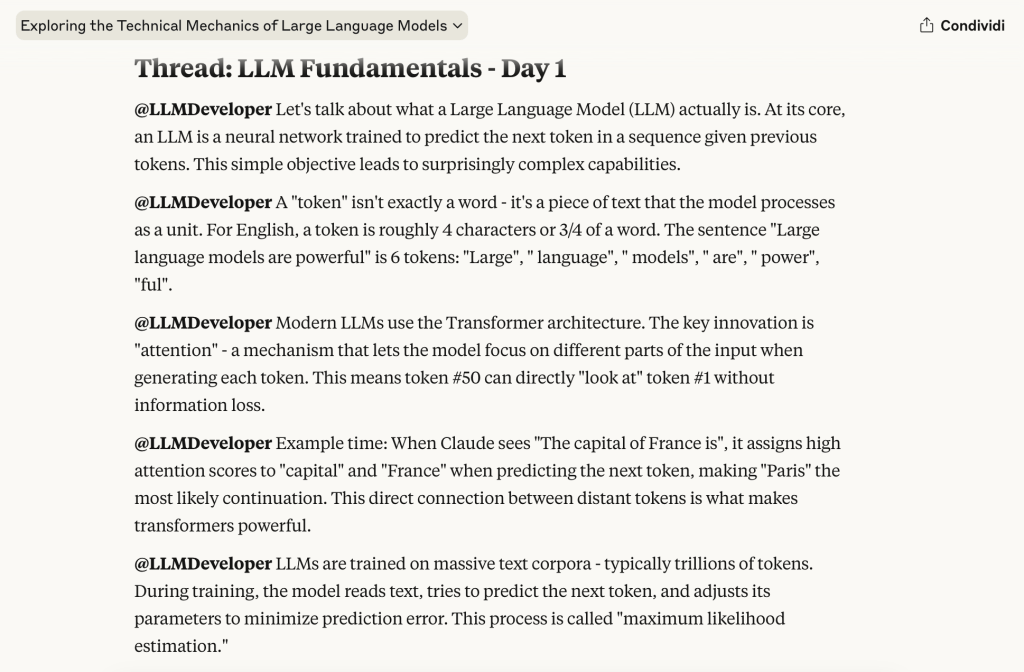
I began to wonder if I could learn something new in that same format. So, I asked Claude to create Twitter/X threads on certain topics. I started by trying to learn about large language models. Every day, I would receive 20 tweets about large language models.
Claude making up Twitter/X threads on LLMs
Now, obviously, hallucinations are a problem, so be mindful of trusting AI entirely. But the point I’m making is that once you know what works for you in terms of learning, you can adapt and use AI to learn new skills in the way that suits you best.
Do you need a video? In the future, you could ask AI to create a video course for you. You could have content written as an exchange between two people in podcast form—NotebookLM is already doing this. You could structure it as a Twitter thread, as I mentioned. All these opportunities are right in front of us.
What is being asked of us now is to start understanding the way you personally learn. Once you have deeper introspection about how you learn best, how you understand things, and how you get excited about learning, you can apply that style to any topic you want and get a personalized learning experience.
Not all the tools are at this stage yet. If we think about creating a video course, we might still be a bit behind compared to anything that a chat interface can create. But we’re not that far off. So, keep this in mind when you begin learning something new—there may be opportunities for you to learn better and faster.
In 2015 I decided I would commit to writing a private no-comments blog everyday.
I got inspired by reading Seth Godin, “The Icarus Deception”, where Seth writes about how important this daily action is.
As a non-english person (I’m italian), this was sure a tough thing to do, mostly because I already know how much difficult is to write good english with no errors.
But there’s one thing that’s helping me improve the way I learn in English, and a few tricks I’d love to share about learning a different language. (more…)